How do I test my mod?

You will first need to create the mod by going to "All installed mods" in the launcher:

Then pressing "Upload mod"

And then in the popup that appears, press "Create mod"
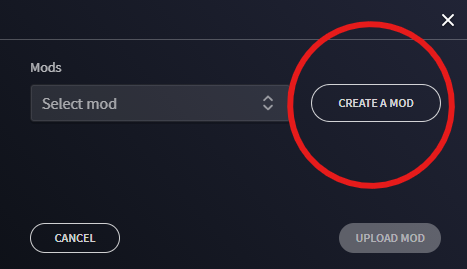
Then fill in the details in the popup which would be correct for your mod (the name, what tags it should have, and which folder it should be saved to)
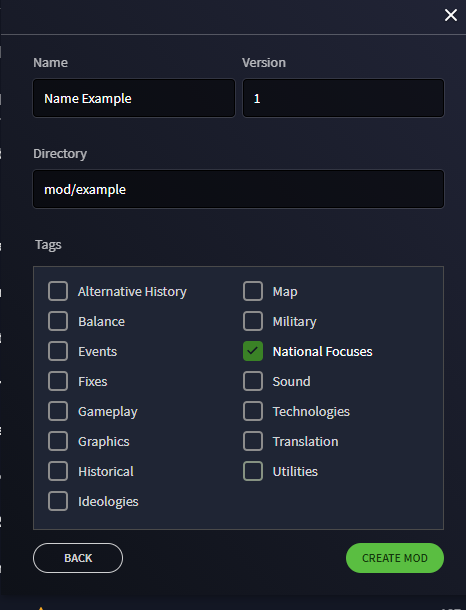
Press "Create mod" and then a new folder should be created in "My Documents/Pardox Interactive/Hearts of Iron IV/[whatever value was in the "location" section]" - so for me, using the above "My Documents/Pardox Interactive/Hearts of Iron IV/mod/example".
Then in that folder, copy the contents of the numbered folder inside the zip file exported from the site (so not the folder 20211214... but the stuff inside that folder)
Then ensure the mod you have created is enabled to be played, and test it works.
If you have any issues with the mod in game, e.g. something not loading, run the game in debug mode and share the error log you get.

My mod worked!
However, the flags are all upsidedown how do I fix this?
Which flag(s) are upside down? If you could link the country/ies that have the issue, I can look into this further.
Which flag(s) are upside down? If you could link the country/ies that have the issue, I can look into this further.
-jordsta95
Every flag is fine, except the flag of my custom country I made.
In the files it looks like this:

But in-game the same flag looks like this:

Can u send me the link to the mod? I'd want to play it
Can u send me the link to the mod? I'd want to play it
-lee
How do I send a link?
The mod is kinda boring right now,
there is only 1 country: French Indochina
and the focus tree is barely done.
do you really wanna play this?
can u send me it when its done?
XxslavicgamerxX
I exported my mod, and now I don't know what to do please help.
thanks in advance